GPU Data Locality & Tiling
Understanding the essence of data locality in GPU and the complexity of Tiling.
The Starting Blocks — Tiling
The basic idea of GPU is to get lots of things done very fast. Nothing less, nothing more.
To do that, a lot of things were put in place — from the hardware architectures to the software stack.
Let’s start with understanding the basic building blocks of a GPU program.
Your Matrix Data
Imagine you have a matrix data that you want to process with the GPU. Let’s call that matrix A and it has the shape of (M × K) which we’ll assign to be 16 × 16 for this discussion.
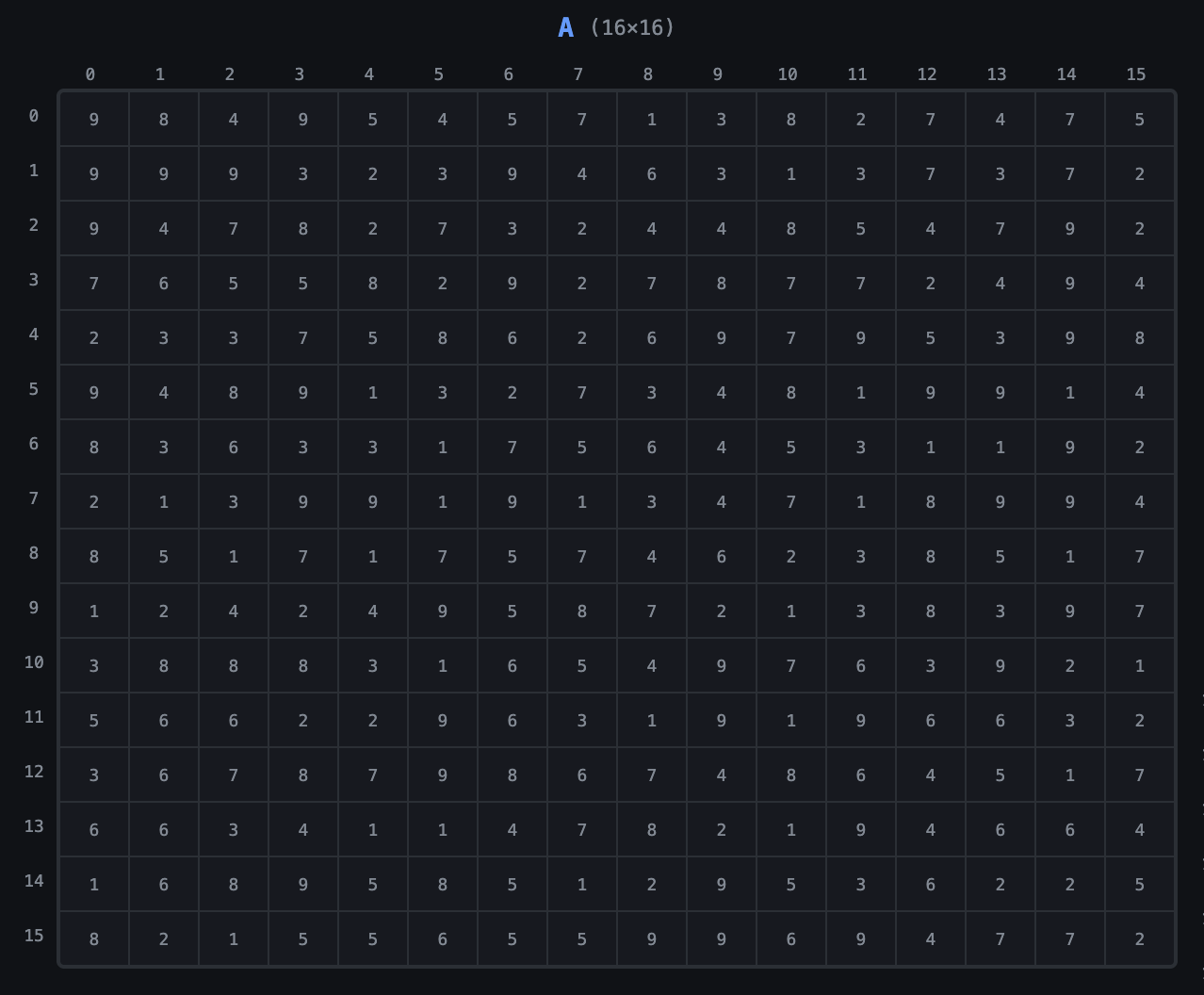
The GPU has to find a way to process that data in parallel, and it does that by making different threads work on different parts of the data.
Grid
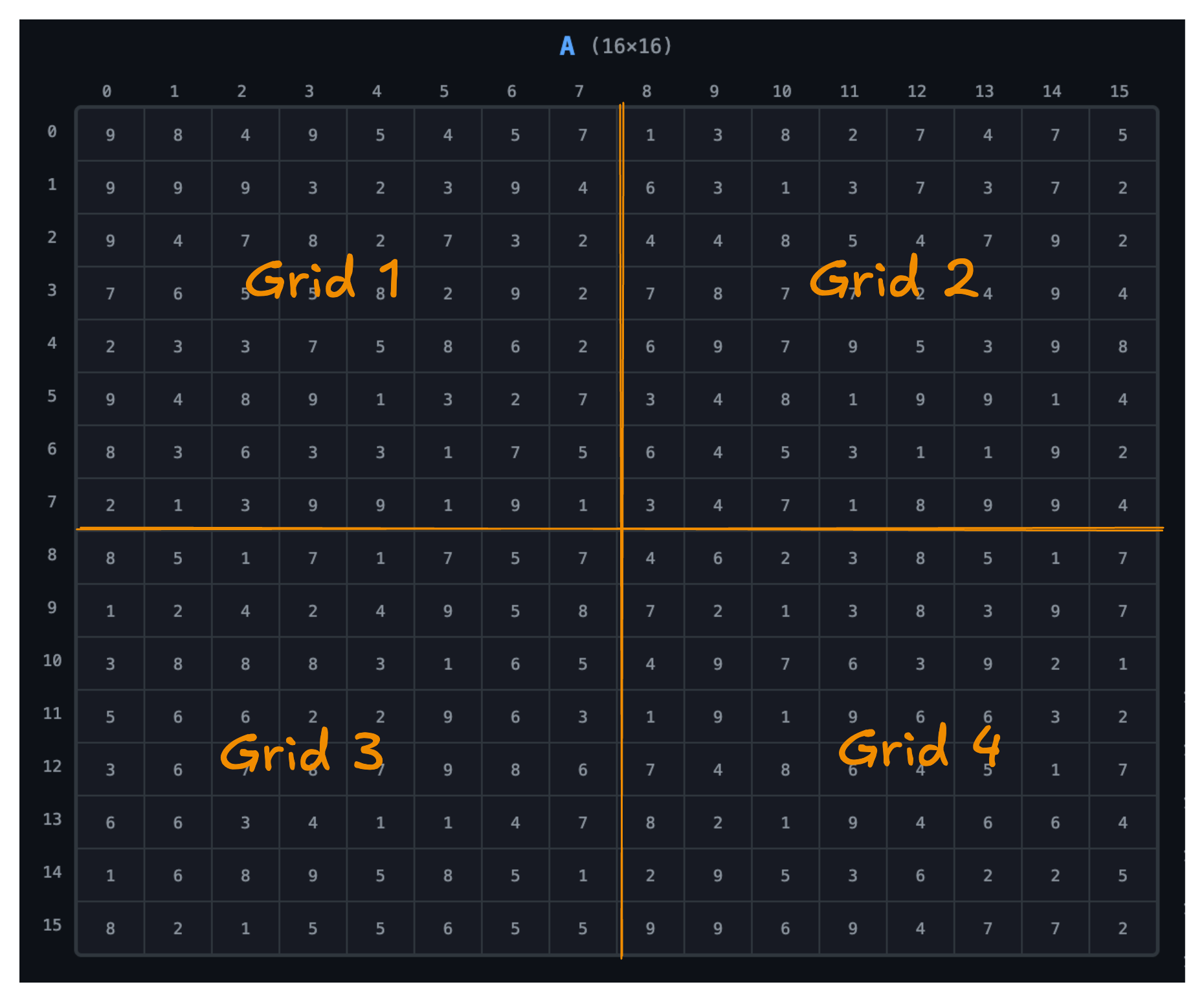
The GPU divides this work into grids. Our data is divided into a 2 × 2 grid. We’ll discuss how we arrive at that later.
Blocks
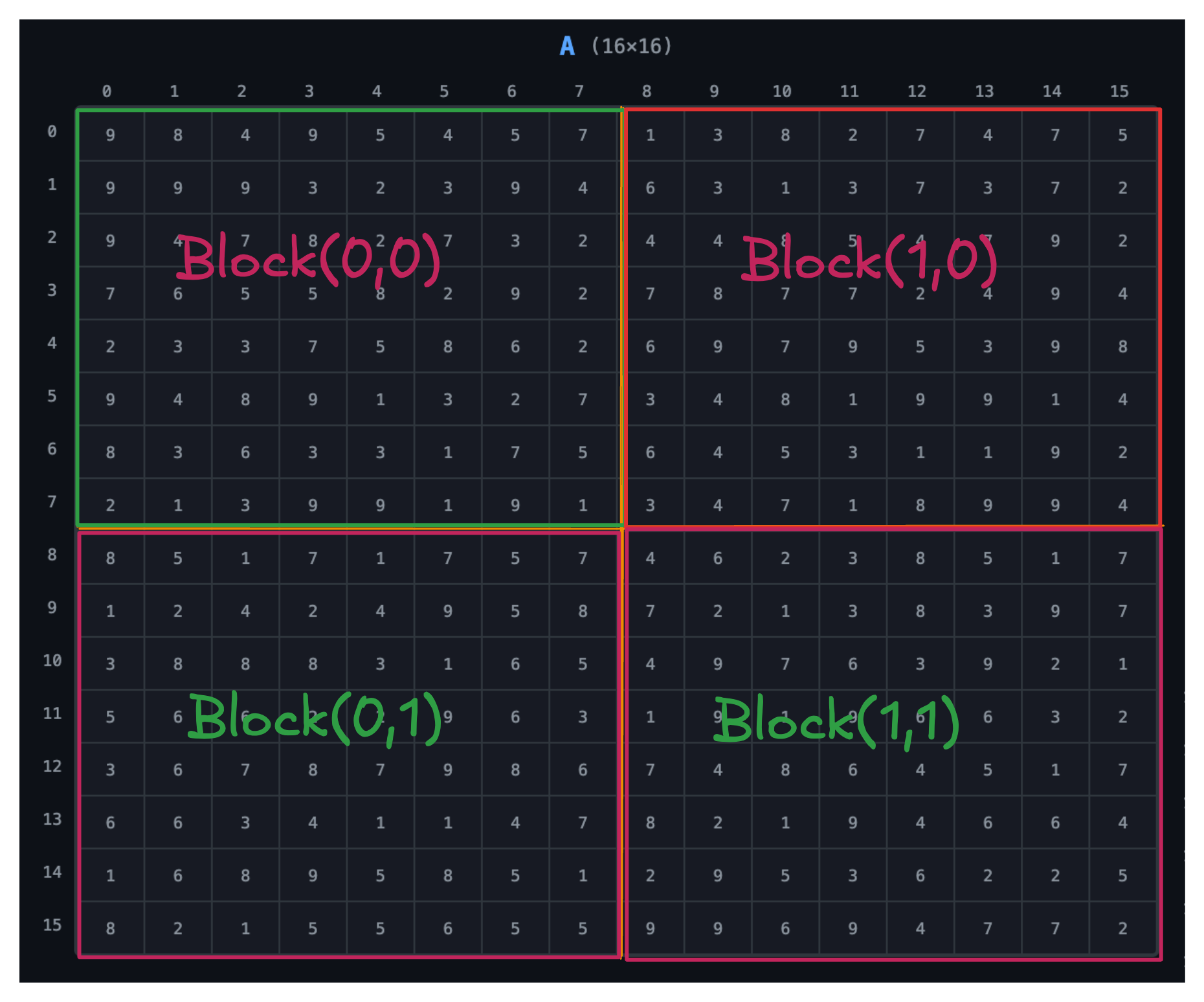
Each grid is assigned a block of threads, and each block is of 8 × 8 dimension.
Threads
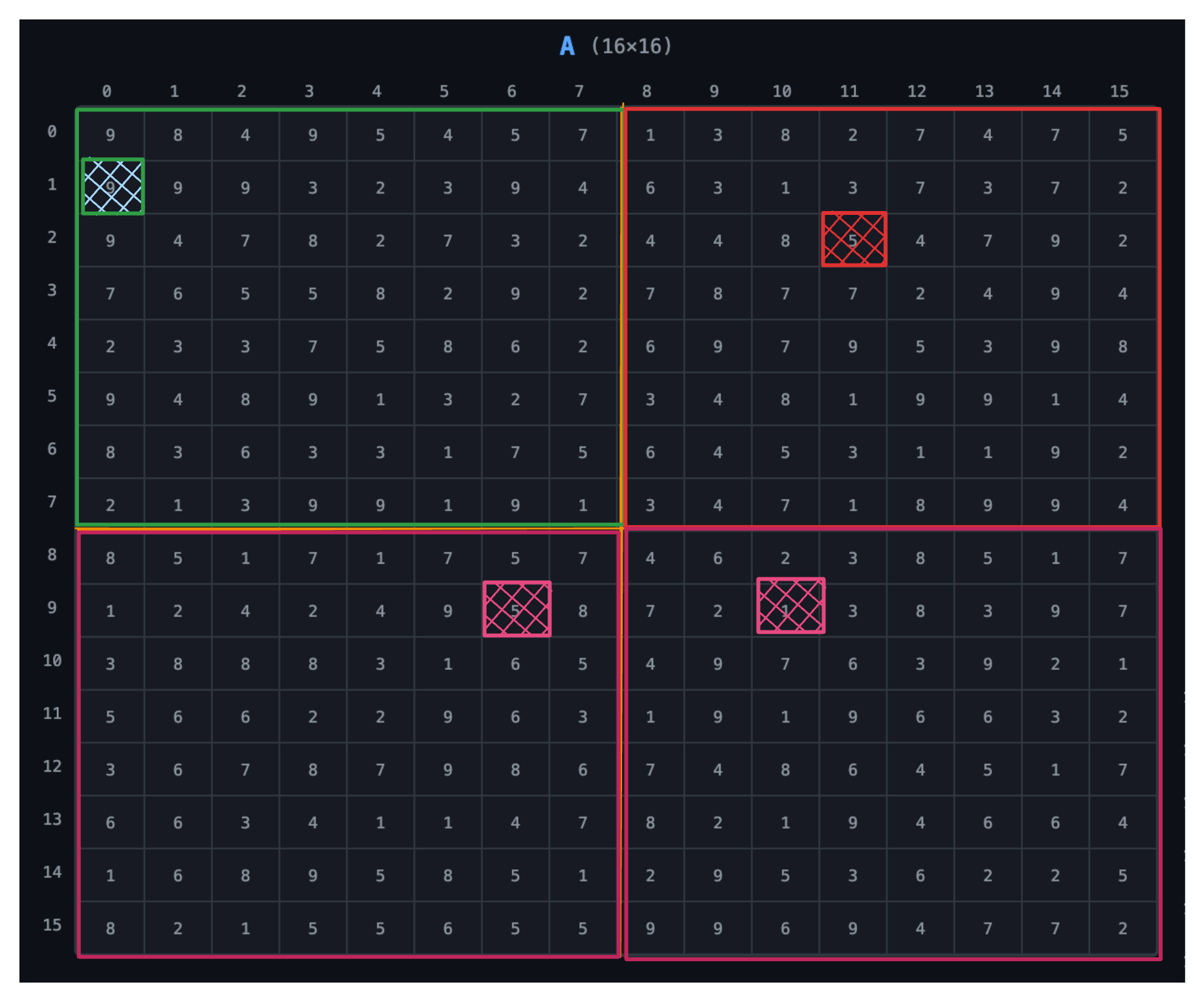
Each block is made up of threads, and each thread is responsible for processing a specific element of the matrix. In this case, each thread will process one element of matrix A.
Warps
Threads are grouped into warps, and each warp is made up of 32 threads. Since we’re dealing with a small matrix, we’ll assume our warps to be of 8 threads.
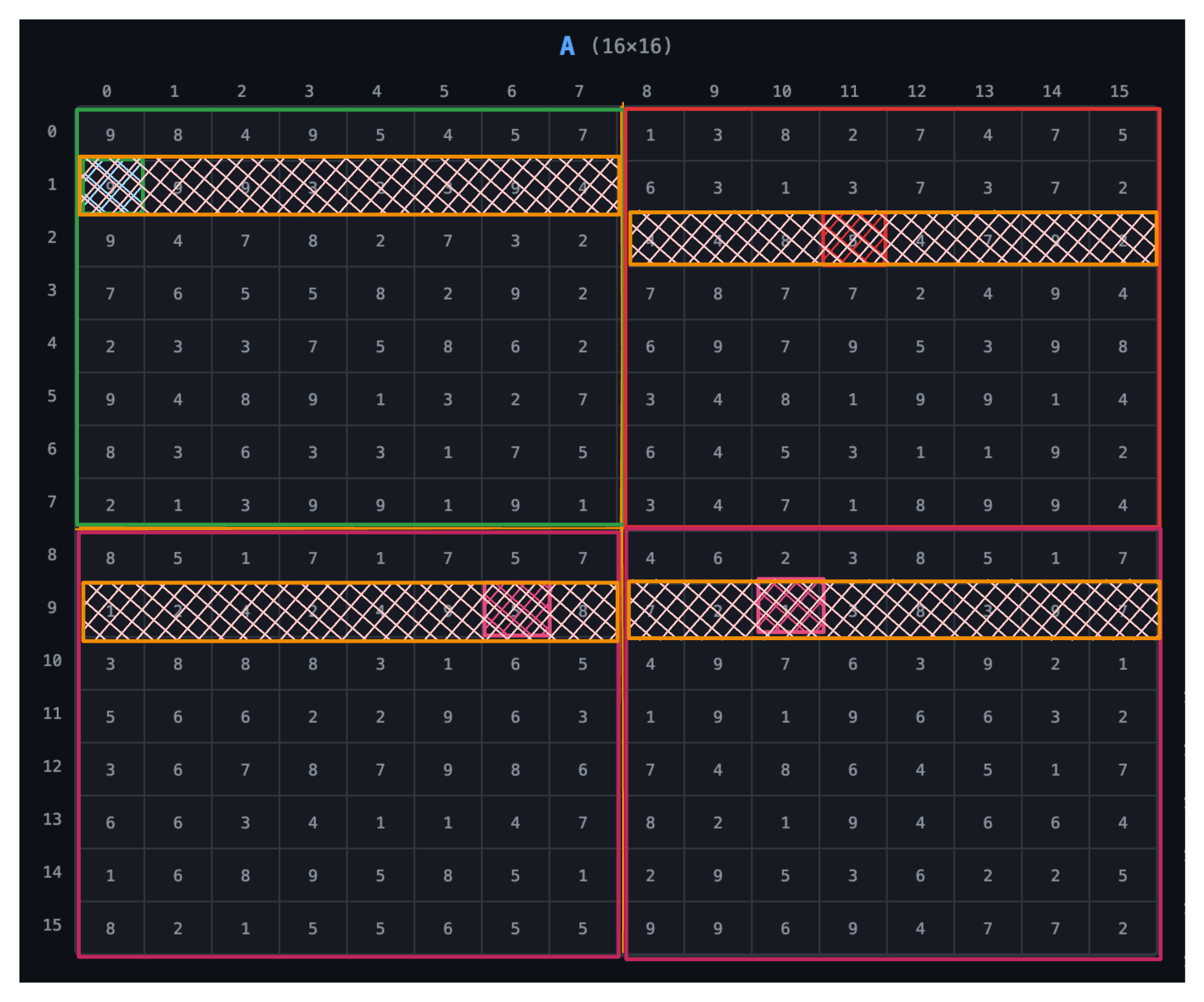
In practice, warps are of 32 threads, and matrix dimensions and block sizes are always in multiples of 32. We’re simplifying here.
Putting It All Together
Each thread processes one element of matrix A, and each block processes a specific part of the matrix:
- Block (0,0) → top-left
- Block (0,1) → top-right
- Block (1,0) → bottom-left
- Block (1,1) → bottom-right
Grid size        = (M/8, K/8) = (16/8, 16/8) = (2, 2)
Block size       = (8, 8)
Threads per block = 8 × 8 = 64
Grid and block can be expressed in 1D, 2D, or 3D. Here we use 2D.
Data Locality
Data locality refers to accessing data in a way that maximizes cache usage and minimizes memory latency.
Here are the levels of data locality in GPU programming:
- Global memory
- L2 cache
- L1 cache
- Shared memory
- Registers
The Memory Hierarchy
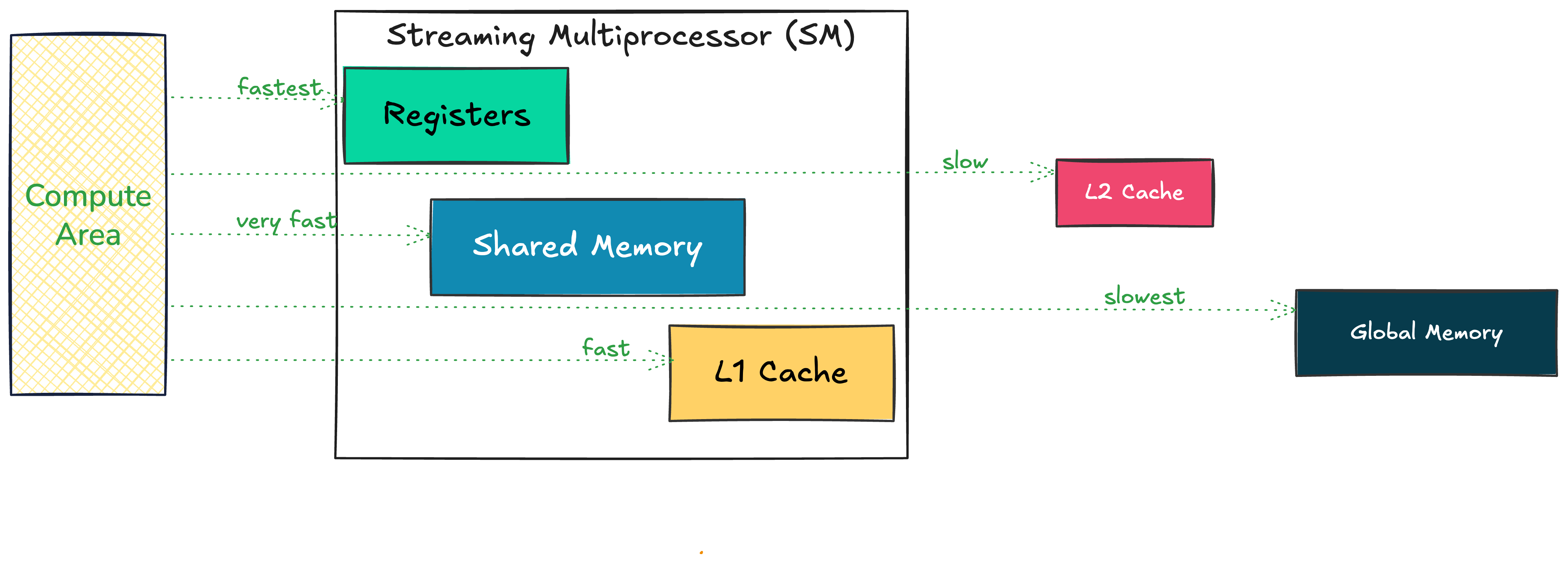
Accessing data from registers is much faster than from global memory. If we want the best performance, our data needs to be closer to the compute area.
Streaming Multiprocessor (SM)
The SM is the basic unit of computation in a GPU. It is responsible for:
- Scheduling warps
- Managing execution of threads
- Managing registers, shared memory, and L1 cache
To optimize your GPU kernel to the fullest, you need to understand your GPU specification — total number of SMs, total registers per SM, etc.
What’s Our Goal?
When solving data locality — moving data from global memory → shared memory → registers — we need to consider:
- Proper data layout and indexing
- Coalesced memory access
- Efficient data movement in and out of shared memory
This can be quite complex based on the tiling strategy we use.
Naive Matrix Multiplication
Starting with a simple matrix multiplication kernel:
__global__ void sgemm_naive(int M, int N, int K,
    float alpha, const float *A,
    const float *B, float beta, float *C) {
  const uint x = blockIdx.x * blockDim.x + threadIdx.x;
  const uint y = blockIdx.y * blockDim.y + threadIdx.y;

  if (x < M && y < N) {
    float tmp = 0.0;
    for (int i = 0; i < K; ++i) {
      tmp += A[x * K + i] * B[i * N + y];
    }
    // C = α*(A@B)+β*C
    C[x * N + y] = alpha * tmp + beta * C[x * N + y];
  }
}
A is M×K, B is K×N, C is M×N. Using M=16, K=16, N=16.
Understanding Thread Indexing
To access data from the matrix, we determine the index by first getting the thread that has access to that index, then we need to know the block that thread is in.
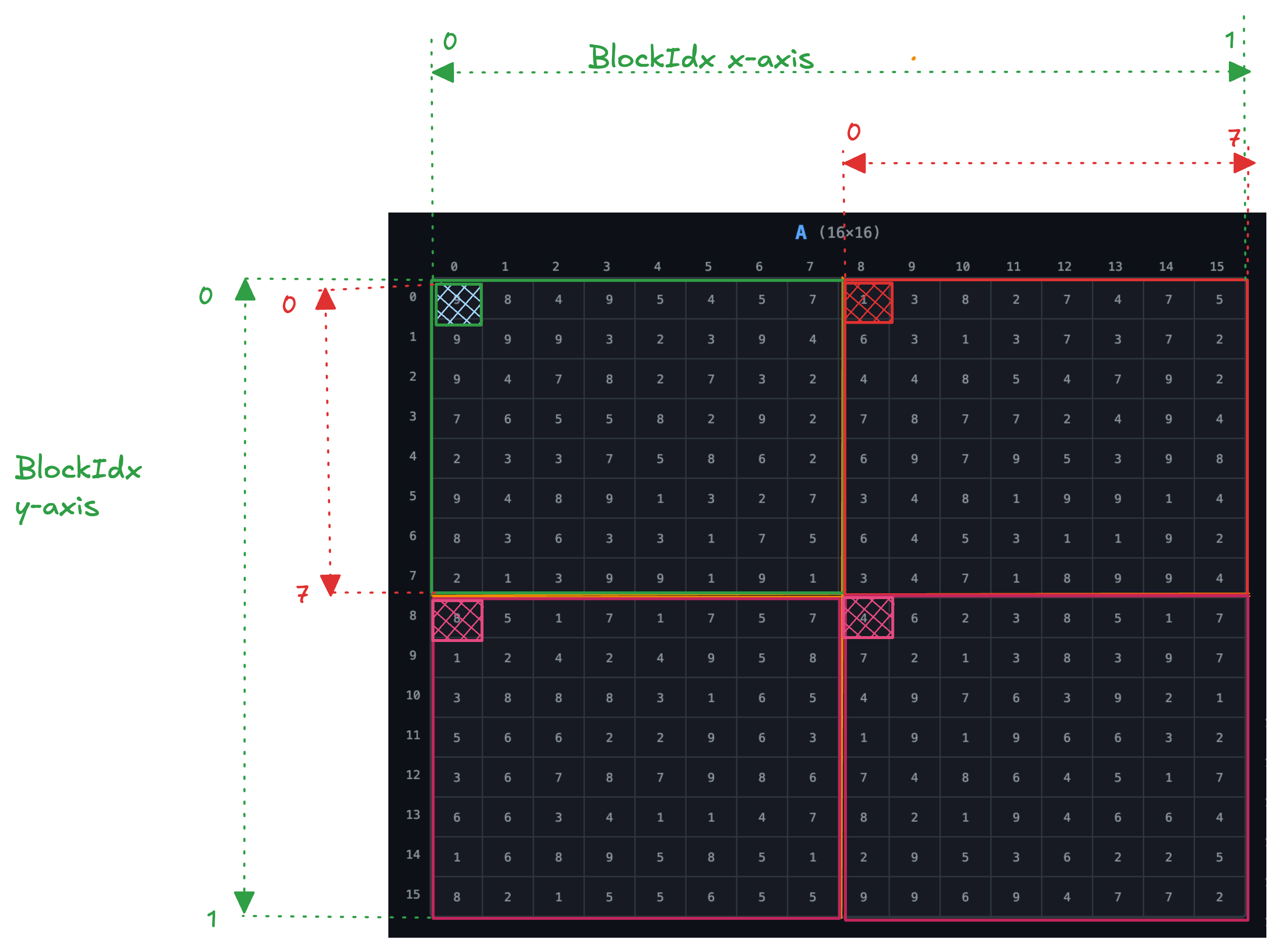
Grid size = (2, 2)
Block     = (8, 8) => (blockDim.x, blockDim.y)
Block & Thread Ranges
From the image, the block in both x and y direction ranges from 0 to 1:
- Block range:
{(0,0), (0,1), (1,0), (1,1)}
The thread in both x and y direction ranges from 0 to 7 for each block:
- Thread range:
{(0,0) … (7,7)}per block
Indexing Example 1
Access element at index (0,0) in matrix A:
blockIdx.x  = 0,  blockIdx.y  = 0
threadIdx.x = 0,  threadIdx.y = 0

x = blockIdx.x * blockDim.x + threadIdx.x
  = 0 * 8 + 0 = 0
The x is used to get the offset in matrix A:
A[x * K + i] = A[0 * 16 + 0] = A[0]
Indexing Example 2
Access element in Block (1,0), second row and third column → thread (1,2):
blockIdx.x  = 1
threadIdx.x = 1,  threadIdx.y = 2

x = blockIdx.x * blockDim.x + threadIdx.x
  = 1 * 8 + 1 = 9
The index in matrix A:
A[9 * 16 + i] = A[144 + i]
This maps to row 9 of matrix A — the second row inside the second block.
Thank You!
Read the full article on BrassinAI